


When I created Askimo, it started as a command-line tool for one specific purpose: automation. The CLI is perfect for recipes, scripting, batch jobs, and anything you want to run without babysitting it. That idea hasn’t changed at all-the CLI remains the automation powerhouse.
But the way people use AI isn’t always automated. A lot of it is interactive: chatting, exploring, refining drafts, switching directions, comparing outputs, digging through history. That kind of work doesn’t feel natural in a terminal.
So the next Askimo release introduces Askimo App-a companion app created specifically for interactive work. The goal isn’t to replace the CLI. It’s to give Askimo a second “mode” that makes the conversational side of AI feel effortless.
Why a Native App? Because interactive work deserves a smoother experience.
If you’ve ever held a long conversation with an AI in the terminal, you know the friction. And if you’ve ever tried switching between OpenAI, Gemini, Claude, or any other provider on the web… you know the chaos.
The provider-switching headache
Right now, each provider lives on its own website. If you want to use OpenAI, you open one tab. To try the same idea with Gemini, you open another. Claude? That’s another tab. Another interface. Another empty chat window.
Nothing carries over. No context. No history. You retype the same prompt over and over just to compare answers.
It breaks your flow.
Askimo App solves this beautifully.
You stay in one chat session. You open settings. You switch the provider. Done.
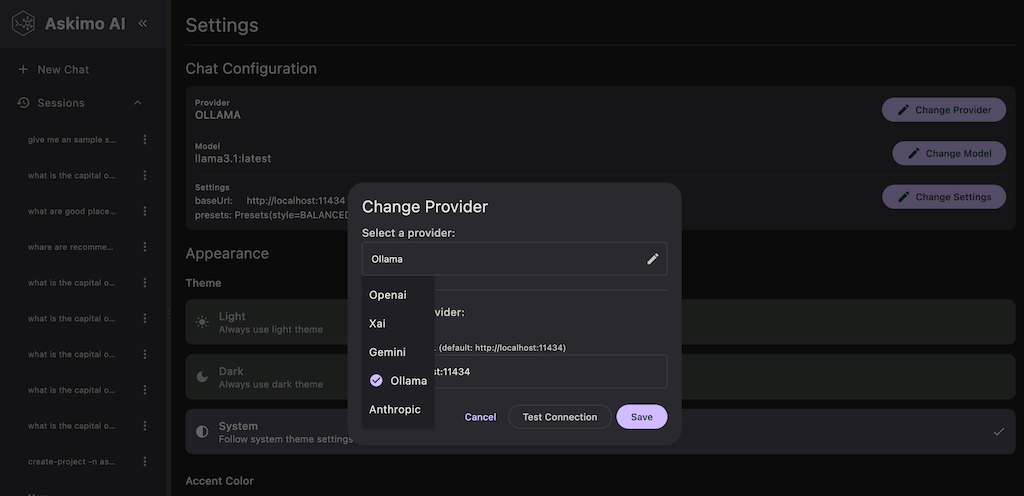
Askimo keeps your workspace exactly where it is and automatically summarizes the conversation so the new model understands what’s going on. You can start a thought with OpenAI, jump to Gemini for a different angle, or ask the same question to Claude-all without starting from scratch.
It finally feels like one unified experience instead of three separate apps fighting for your attention.
Speed, privacy, and staying local
A browser is convenient, but it’s never truly fast. Everything goes through layers of JavaScript, layout cycles, and network hops. Askimo App cuts all of that out. It runs directly on your machine and uses your CPU and memory fully, so interactions feel instant.
And everything stays local:
-
chat history
-
project context
Nothing leaves your device except the message you send to the provider. If you connect Askimo to Ollama or another local model, you can run the whole app offline. Just a simple, fast, private tool that works wherever you are.
History that doesn’t slow you down
Another thing I wanted to fix is how long conversations behave. Web chat apps tend to slow down the moment a conversation gets big. Some even freeze because they’re trying to render hundreds of messages at once. When you actually use AI to think, explore, or draft real work, your sessions get long—and browsers just aren’t built for that.
Askimo App takes a different approach. It only keeps a lightweight slice of the conversation in view and loads older messages only when you scroll to them. When you move back down, it clears what’s not needed. The whole thing stays fast because it’s not trying to hold everything in memory at once.
This makes searching old threads effortless too. You can jump across previous ideas, skim earlier reasoning, or pick up an abandoned thought with zero delay. Even massive conversations stay smooth, and the app never starts dragging behind you.
Askimo is growing.
Askimo is expanding into areas it hasn’t reached before. The CLI built the foundation for automation, and now the native app opens the door to the interactive side of AI-both living side by side, each doing what it does best.