

Askimo v1.0 is here and it brings a major upgrade to how you chat, organize your work, and interact with AI. This release introduces the first Askimo App app along with significant improvements to chat workflows, customization, and productivity features. The goal is simple: make Askimo something you can rely on every day for real work, not just one-off prompts.
A New Desktop Experience Built for Real Workflows
Browser based AI tools often struggle with long conversations. They slow down, lock up, or make it hard to search through older messages. Askimo App takes a different approach and stays fast no matter how much history your chat contains.
Smooth performance with large chat histories
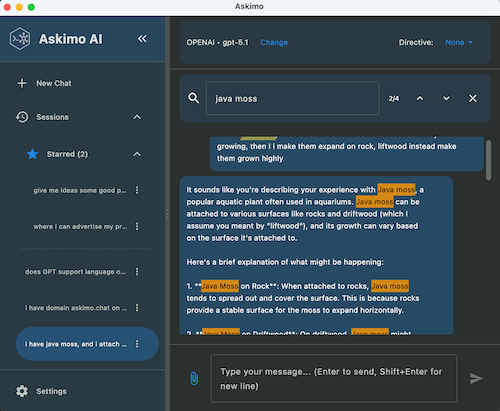
Askimo uses smart lazy loading. It only renders the messages you currently see and loads older ones when you scroll up. This keeps the app responsive even if you chat for days or weeks in the same thread.
Search across your entire conversation
You can search for any message in the full chat history, not just what is visible. This helps when you revisit a previous idea, dig up a code snippet, or pick up where you left off in a long project.
Custom directives for consistent results
You can define directives that shape how the AI behaves across all chats. You might use this for writing tone, code style, output formatting, or anything else you want to stay consistent. This saves a lot of time because you no longer repeat the same instruction every session.
Themes and font customization
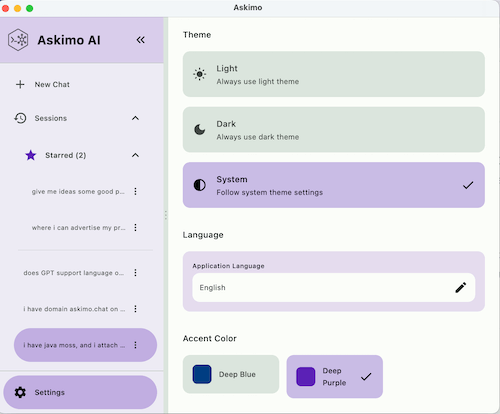
You can tune the look and feel of the app to match your preferences. Change themes, adjust color tone, or increase the font size to make long sessions more comfortable.
Keyboard shortcuts for faster actions
You can open a new chat, search, attach files, and move around the interface using quick key combinations. This makes the workflow feel natural, especially if you are someone who prefers staying on the keyboard.
Askimo App gives you a focused, stable environment where you can think, iterate, and build without the usual friction of web-based tools.
Better Chat and Session Management
We improved almost every part of the chat experience to make Askimo more useful for long-term projects.
Organize your conversations
You can group chats into folders, star important sessions, and clean up older ones. This helps when you work on multiple topics or projects at the same time.
Export chat history
You can export your chats if you want to save them, share them, or analyze them later.
Attach files directly in the chat
You can attach documents, code files, or other resources so the AI has the context it needs. Askimo handles responses in a more predictable way so tools feel consistent no matter what task you send.
Cancel a running chat
If the response starts heading in the wrong direction, you can stop it immediately and refine your request.
Together these updates make Askimo feel more like a daily workspace and less like a disposable prompt window.
Improved Keyboard Support and Navigation
We refined shortcuts and improved search highlighting so you can move through the interface more comfortably. If you do a lot of writing or coding, these small improvements add up and help keep your hands in flow.
Updated Themes and Visuals
Themes have been improved with clearer colors and smoother font scaling. The updated visuals help reduce eye strain and make the interface more pleasant during long sessions. The refreshed icons and layout bring a cleaner, more consistent look across the entire app.
CLI Improvements for Automation
If you use Askimo in the terminal, the CLI now supports deleting old sessions and reading recipe input from standard input. This helps you script workflows, integrate Askimo into your development process, and build automation around your own prompts and recipes.
Install Askimo
You can install the new version using the instructions below:
- Desktop: https://askimo.chat/docs/desktop/installation/
- CLI: https://askimo.chat/docs/cli/installation/
Verify your download with the SHA256SUMS.txt file included in the release.