

Everything You Need
For Productive AI Conversations
Askimo App is packed with features designed to enhance your AI workflow and keep you productive.
See It In Action
Watch how Askimo App enhances your AI workflow with powerful features.
RAG Support (Retrieval-Augmented Generation)
Connect your documents, code, and knowledge base to AI conversations. Askimo indexes your files locally using Apache Lucene and jvector, enabling fast semantic search and context-aware responses. Your AI can now reference your actual documents, making answers more accurate and relevant to your specific needs.
Works with ChatGPT, Claude, Gemini & Ollama
Seamlessly switch between ChatGPT, Claude, Gemini, and Ollama local models. Compare responses from different AI models side-by-side without leaving the app. Also supports Grok, LM Studio, LocalAI, and Docker AI for complete flexibility.
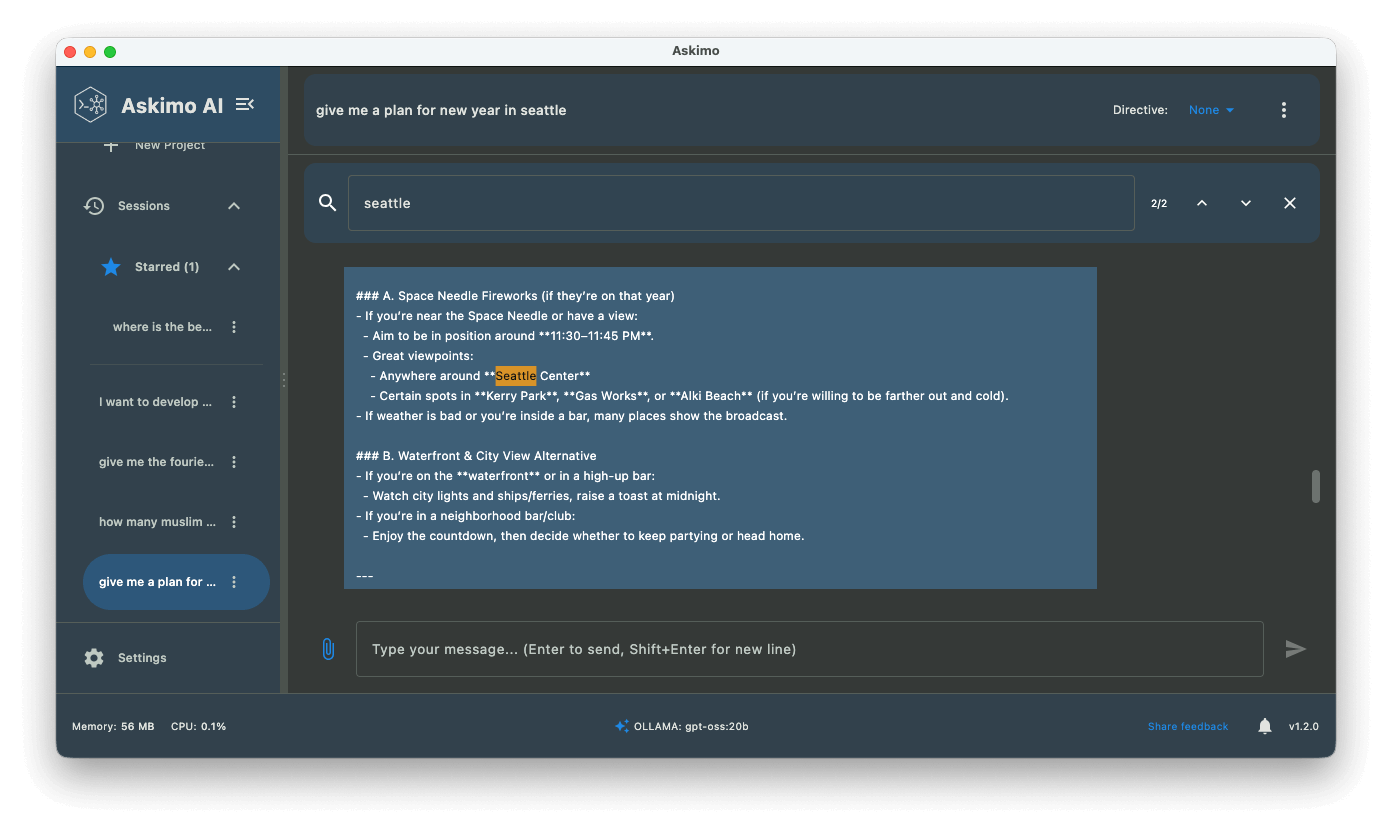
Full-Text Chat Search
Search across all your AI conversations instantly. Find past discussions with ChatGPT, Claude, or Gemini from weeks ago in seconds with powerful full-text search and filtering.
Custom Directives
Create custom system prompts to shape AI behavior. Build different personas for coding, writing, research, and more. Switch between them with one click.
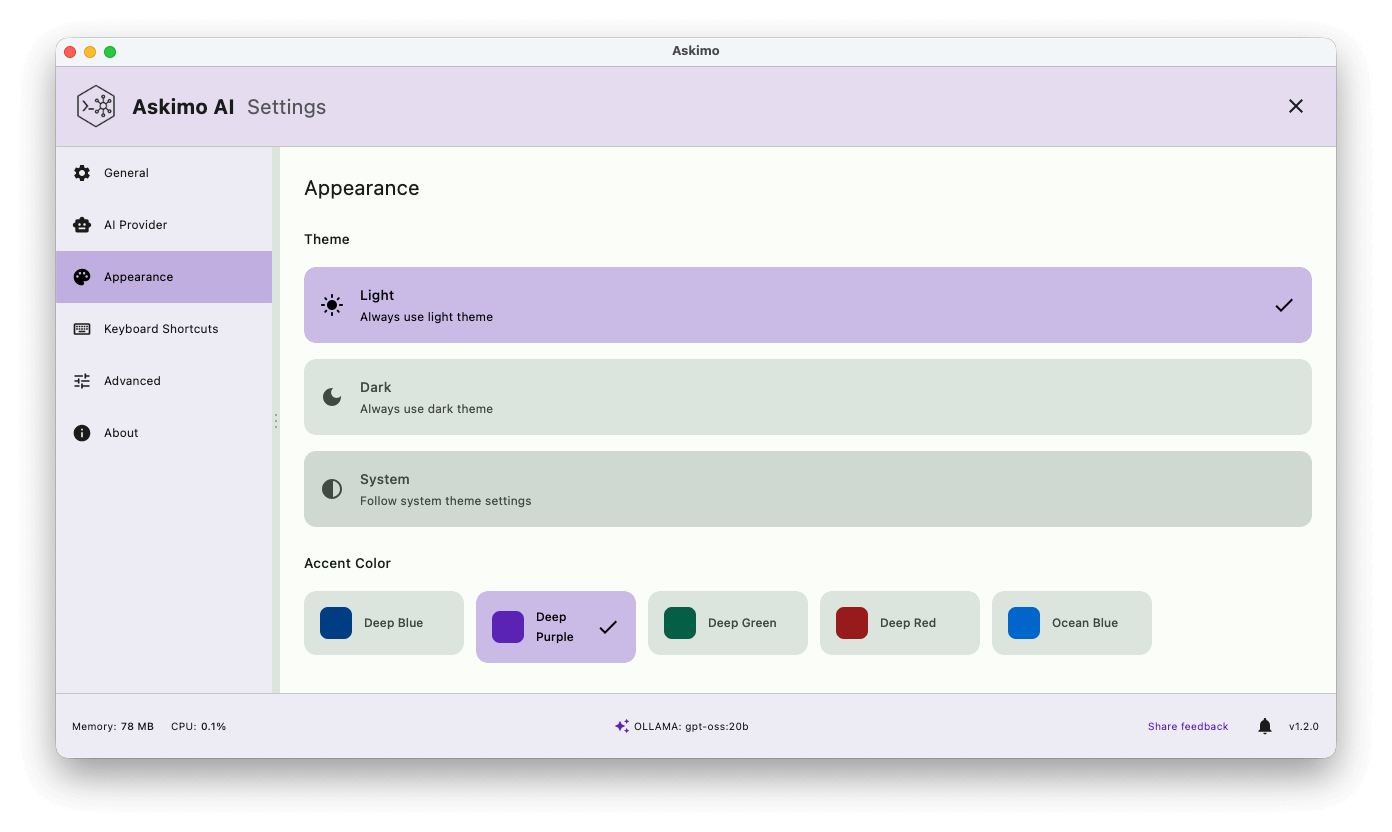
Complete Visual Customization
Personalize every aspect of your Askimo workspace. Choose from multiple beautiful themes with light and dark modes. Customize fonts, adjust font sizes for optimal readability, and set custom icons for chat agents and users. The interface scales perfectly across all screen sizes—from compact laptop displays to expansive 4K and 8K monitors. Your desktop app should reflect your style and work perfectly on your setup.
Core Features
Essential tools for every AI conversation.
Works with ChatGPT, Claude, Gemini & Ollama
Seamlessly switch between ChatGPT, Claude, Gemini, and local Ollama models in one unified interface. Also supports Grok, LM Studio, LocalAI, and Docker AI. Compare responses from different AI models without leaving the app.
Persistent Chat History
Never lose a conversation. All your chats are saved locally with full-text search and organization. Access your history even when offline.
Rich Formatting
Beautiful markdown rendering with code syntax highlighting, tables, lists, and support for images and attachments.
Custom Directives
Create and save custom system prompts (directives) to shape AI behavior. Build different personas for coding, writing, research, and more.
Unified Prompt Library
Save and reuse your favorite prompts. Build a library of templates for common tasks and workflows.
Keyboard Shortcuts
Lightning-fast navigation with customizable keyboard shortcuts. Control everything without touching your mouse.
Advanced Capabilities
Power user features for productivity and workflow optimization.
Lazy Loading & Performance
Efficient memory usage with virtualized message rendering. Unlike web-based UIs that render entire conversations into the DOM, Askimo only loads what you need. Older messages load only when you scroll up, keeping the app fast even with massive chat histories spanning hundreds or thousands of messages.
- ✓ Smooth scrolling even in very long conversations
- ✓ Low memory footprint compared to web wrappers
- ✓ Fast startup and responsive UI
- ✓ Perfect for long research sessions
RAG Support
Retrieval-Augmented Generation support for enhanced context and knowledge-based conversations. Connect your documents and data sources for more informed AI responses.
- ✓ Context-aware conversations with your documents
- ✓ Enhanced accuracy with relevant information
- ✓ Local document processing for privacy
- ✓ Support for multiple file formats
Keyboard Shortcuts
Lightning-fast navigation with fully customizable keyboard shortcuts. Control everything without touching your mouse. Power users will feel at home.
- ✓ ⌘/Ctrl + N: New chat
- ✓ ⌘/Ctrl + F: Search in conversation
- ✓ ⌘/Ctrl + K: Quick provider switch
- ✓ ⌘/Ctrl + E: Export conversation
Star & Organize
Mark important conversations as favorites for quick access. Keep your most valuable chats at your fingertips. Build a knowledge library over time.
- ✓ One-click starring of important chats
- ✓ Quick filter to view favorites only
- ✓ Never lose important conversations
- ✓ Build your personal AI knowledge base
Export Conversations
Export conversations in multiple formats: Markdown, JSON, and HTML. Perfect for documentation, sharing, code reviews, data processing, or archiving important discussions.
- ✓ Markdown for documentation
- ✓ JSON for data processing
- ✓ HTML for web publishing
- ✓ Easy sharing with team members
Multi-Language Support
Available in 9 languages: English, Japanese, Spanish, French, German, Korean, Portuguese, Vietnamese, and Chinese. Full localization of the entire interface.
- ✓ Native language support
- ✓ Localized menus and settings
- ✓ Right-to-left language support
- ✓ Community-driven translations
Privacy & Performance
Built with privacy and performance in mind.
Local Storage
All your conversations and data are stored locally on your machine. Your data never leaves your control.
No Tracking
Zero analytics, no telemetry, no data collection. Your conversations are completely private.
Offline Access
Access your chat history and work with local models even without an internet connection.
Lazy Loading
Efficient memory usage with virtualized message rendering. Older messages load only when you scroll up, keeping the app fast even with massive chat histories.
Native Performance
Built as a true desktop application with native performance. Fast startup, smooth scrolling, and responsive UI.
Resource Efficient
Minimal memory footprint compared to web-based alternatives. Efficient rendering keeps your system running smoothly.
Works With All Major AI Providers
One app for all your AI needs. Connect to local and cloud providers seamlessly.
OpenAI
GPT-5.2, GPT-4o, o1, o3-mini
CloudAnthropic Claude
Claude 3 Opus, Sonnet, Haiku
CloudGoogle Gemini
Gemini Pro, Ultra
CloudGrok
Grok models
CloudOllama
Local models (Llama, Mistral, etc)
LocalLM Studio
Professional local AI
LocalLocalAI
Self-hosted AI server
LocalDocker AI
Containerized AI models
LocalPerfect for Every Workflow
Whether you code, write, research, or create, Askimo fits your workflow.
Developers
Compare code solutions from different AI models. Debug with multiple AI perspectives. Keep all technical conversations organized.
Example Use Cases:
Content Creators
Get diverse writing suggestions instantly. Save and reuse your best prompts. Maintain context across long projects.
Example Use Cases:
Researchers
Analyze topics from multiple AI viewpoints. Search through all your research conversations. Export for documentation.
Example Use Cases:
Business Users
Access enterprise AI providers securely. Keep sensitive data on your machine. Build team prompt libraries.
Example Use Cases:
Ready to Experience All These Features?
Download Askimo for macOS, Windows, and Linux. Start using these powerful features today.