

If you’ve ever wanted to ask questions about your documents, research papers, or project files without uploading them to the cloud, RAG (Retrieval-Augmented Generation) with Ollama in Askimo makes it possible. Your local AI models like Llama 3, Mistral, or Phi-3 can answer questions about your PDFs, Word documents, notes, and any text-based files—all running entirely on your machine.
TL;DR: Install Ollama, pull a model like
llama3ormistral, download Askimo, create a project pointing to your document folder, and start asking questions. Your files are indexed locally, and the AI retrieves relevant information to answer your questions—no internet required after setup.
New to Ollama? Check out our guide on why Askimo is the best desktop app for Ollama to learn about all the features that make working with local AI models effortless.
Why Use RAG with Ollama for Your Documents?
The Problem: AI Doesn’t Know Your Files
When ChatGPT and similar AI assistants first emerged, they were revolutionary for answering general questions—ask about any city, explain a concept, or get product recommendations, and you’d get helpful responses. These tools excel at general knowledge because they’re trained on vast amounts of public data.
But as users tried to apply AI to their actual work, they hit a wall:
The Single Document Limitation: Early on, you could upload one document and ask questions about it. This worked for quick tasks like “summarize this report” or “find the key points in this article.” But real work involves much more:
- Research papers: You don’t have one paper—you have 20, 50, or 100+ papers you need to synthesize
- Company policies: Your organization has dozens of policy documents, procedure manuals, and guidelines
- Project documentation: Meeting notes, requirements docs, technical specs, and client communications scattered across files
- Personal knowledge: Years of notes, research, and writing you want to reference
The Deeper Problem: When you ask a typical AI assistant about your work:
-
Generic Answers: The AI responds based on its training data from the internet, not what’s actually in your specific files. Ask “What’s our refund policy?” and it might give you generic e-commerce advice instead of your company’s actual policy.
-
Hallucinations: Without access to your documents, the AI might make up information that sounds plausible but doesn’t exist in your files. This is especially dangerous for research, legal work, or any field requiring accuracy.
-
No Context Across Multiple Files: You can’t ask “What do all my research papers say about methodology?” or “Find contradicting information in our policy documents.” The AI doesn’t have a holistic view of your document collection.
-
Lost Knowledge: All those years of accumulated notes, research, and documents? The AI can’t help you find patterns, connections, or forgotten insights buried in your files.
-
Privacy Concerns: To get any document-specific help, you’d need to upload sensitive documents to cloud services. For confidential research, proprietary business information, or personal data, this is a non-starter.
The Real Struggle: People want AI that deeply knows their work—not just one document at a time, but their entire knowledge base. They need an assistant that can:
- Search across 100+ research papers to find common themes
- Reference all company policies when answering employee questions
- Connect ideas across years of personal notes and writing
- Provide accurate answers grounded in their actual documents, not internet training data
This is exactly what RAG with Ollama solves.
The Solution: RAG Makes Local AI Document-Aware
With RAG, Ollama models become your personal research assistant that actually knows your files:
- Grounded Answers: Responses reference your actual documents, not generic information
- File Memory: The AI “remembers” all your documents and their contents
- Instant Context: Automatically retrieves relevant information when you ask questions
- Complete Privacy: Everything runs locally—your files never leave your machine
Learn more: For a detailed comparison of Ollama clients, see our Best Ollama Clients in 2026 guide to understand why RAG capabilities matter when choosing an Ollama desktop app.
How RAG Works with Ollama
When you create a project in Askimo and enable RAG:
- Indexing: Your files are read, broken into chunks, and organized for fast searching
- Storage: The index lives on your machine (typically takes 10-30% of your file size)
- Retrieval: When you ask a question, relevant information is automatically found
- Injection: These snippets are shown to the AI before it answers
- Generation: Ollama models use this context to give accurate, document-specific answers
All of this happens locally—no external API calls for indexing or retrieval.
Want technical details? Visit our RAG documentation for in-depth information about how indexing and retrieval work.
Real-World Use Cases
Research: Synthesizing Across Multiple Papers
The Challenge: You have 50+ research papers on climate change. Traditional search finds keywords but can’t synthesize findings across documents.
With RAG:
You: "What are the main findings across all my climate research papers?"
Llama 3: Based on your papers, three key findings emerge:1. Temperature increases correlate with CO2 levels (mentioned in 12 papers)2. Ocean acidification is accelerating faster than predicted (7 papers)3. Renewable energy adoption is cost-effective (15 papers with economic data)
Sources: climate-change-2023.pdf, renewable-study.docx, ocean-research.pdf [and 9 more]
Real Questions You Can Ask:
- “Compare the methodologies used across my renewable energy studies”
- “What datasets appear most frequently in my research collection?”
- “Find contradicting conclusions about solar panel efficiency”
Writing: Managing Long-Form Projects
The Challenge: Your novel has 30 chapters, character notes, world-building docs, and plot outlines. Keeping track of details across hundreds of pages is difficult.
With RAG:
You: "Has Elena ever mentioned being afraid of water in any chapter?"
Mistral: Yes, in chapter 7 Elena mentions she nearly drowned as a child. She alsoavoids the harbor scene in chapter 12 saying "I don't do boats." Your characternotes list this as a key personality trait stemming from her childhood incident.
Sources: chapter-07.docx, chapter-12.docx, character-profiles.md
Real Questions You Can Ask:
- “What magic abilities has the antagonist demonstrated so far?”
- “List all the locations I’ve described in the Eastern Kingdom”
- “What timeline inconsistencies exist between chapters 3, 8, and 15?”
Work: Quick Access to Company Knowledge
The Challenge: Your team has hundreds of documents—policies, meeting notes, project specs, client feedback. Finding specific information wastes hours each week.
With RAG:
You: "What's our policy on remote work expenses?"
Llama 3: According to the HR Policy Handbook (updated Jan 2026), employees canexpense up to $500/month for home office equipment and $150/month for internet.Receipts must be submitted within 30 days. See section 4.2 for full details.
Source: HR-Policies-2026.pdf (page 23)
Real Questions You Can Ask:
- “What were the action items from last week’s team meeting?”
- “Find all client feedback mentioning the mobile app”
- “Summarize the Q4 2025 performance metrics”
Setting Up RAG with Ollama
Step 1: Install Ollama
Ollama runs locally on macOS, Windows and Linux.
macOS:
# Download from https://ollama.com/download/mac# Or use Homebrewbrew install ollamaLinux:
curl -fsSL https://ollama.com/install.sh | shWindows:
# Download installer from https://ollama.com/download/windowsTest your install:
ollama run llama3Detailed Ollama setup: For step-by-step instructions on configuring Ollama with Askimo, see our Ollama provider guide.
Step 2: Pull an Embedding Model
RAG needs an embedding model to convert your documents into searchable information:
ollama pull nomic-embed-textThis is Askimo’s default embedding model for Ollama—it’s fast and works well for all types of documents.
Step 3: Pull a Chat Model
Choose a model based on your computer’s memory:
# For 8GB+ RAM - Fast and capableollama pull llama3
# For 16GB+ RAM - Excellent for complex questionsollama pull mistral
# For 4-8GB RAM - Lightweightollama pull phi3Step 4: Install Askimo
Download Askimo for your platform:
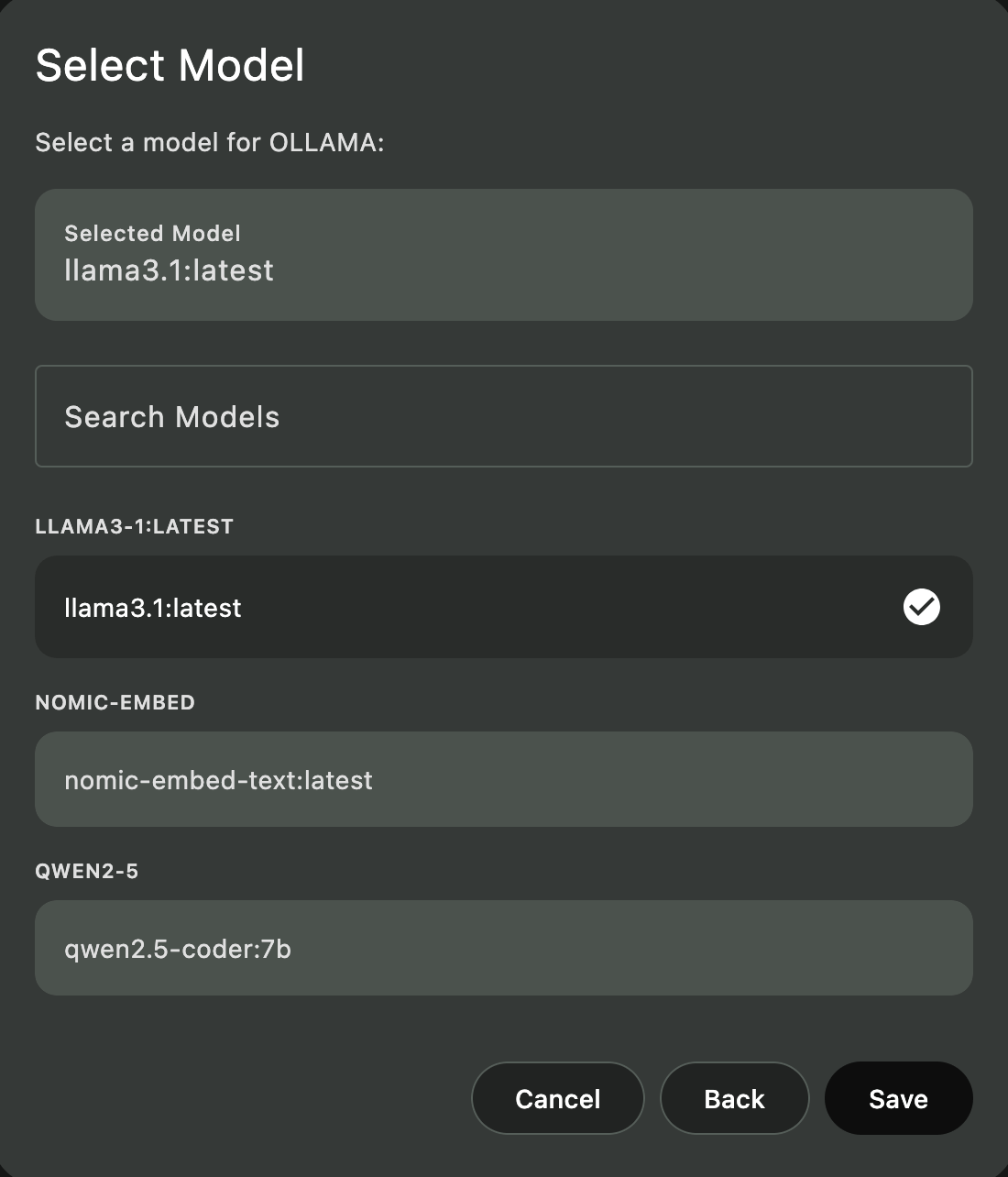
Step 5: Configure Ollama in Askimo
- Open Askimo
- Go to Settings → Providers
- Enable Ollama
- Set endpoint to
http://localhost:11434 - Select your chat model (e.g.,
llama3) - Set embedding model to
nomic-embed-text
Step 6: Create a Project with RAG
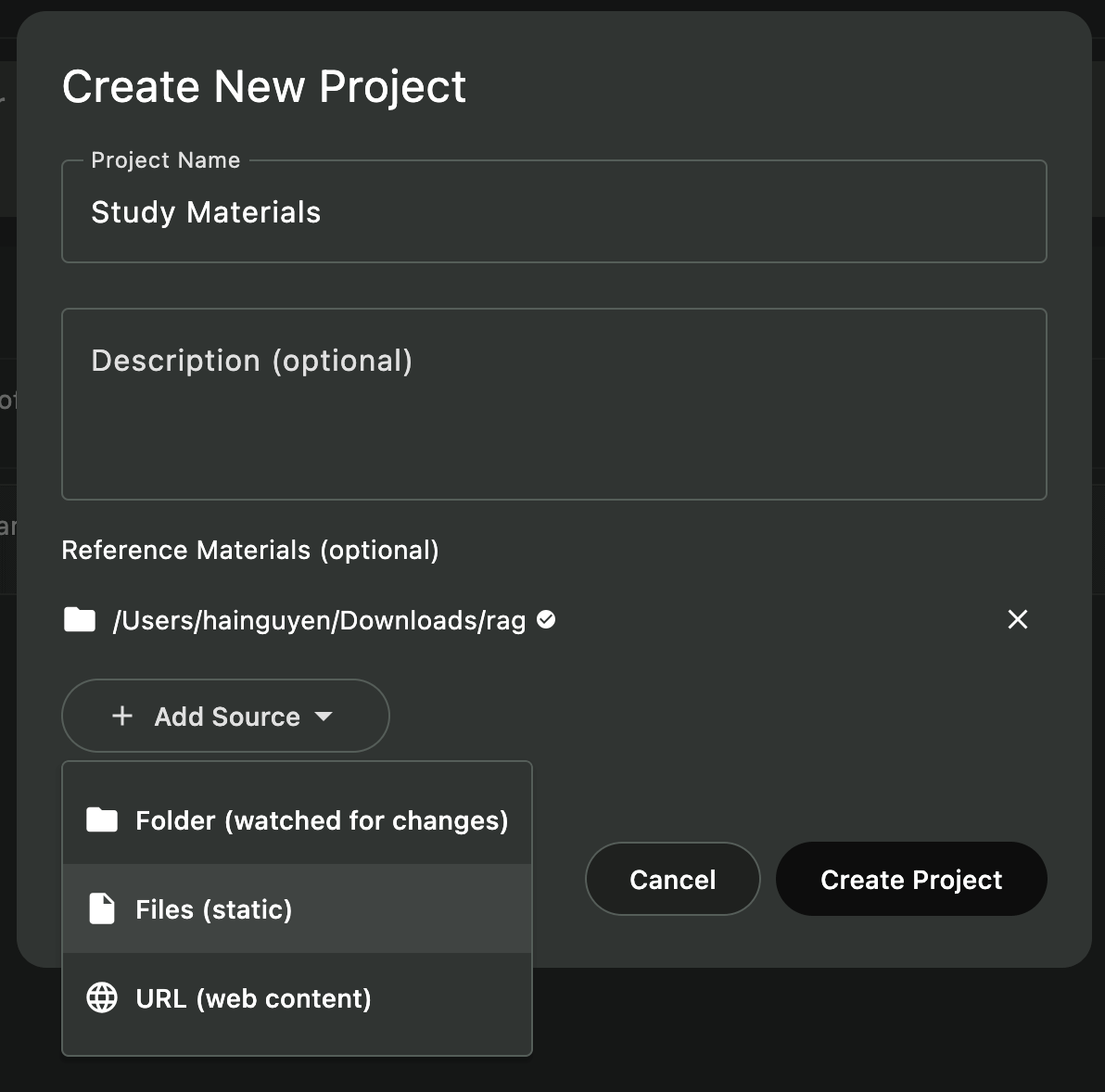
-
Open Project Manager
- Click the “Projects” icon in the sidebar
- Or use
⌘/Ctrl + P
-
Create New Project
- Click ”+ New Project”
- Enter a name (e.g., “My Research Papers”, “Book Notes”, “Study Materials”)
- Click “Select Folder” and choose your document folder
-
Automatic Indexing
- Askimo detects your files automatically
- Indexing starts in the background
- Wait for completion (10-60 seconds for typical document collections)
-
Start Chatting
- Create a new chat within the project
- RAG is automatically enabled
- Ask questions about your documents!
Pro tip: You can create multiple projects for different purposes—one for work documents, one for personal research, one for study materials, etc.
What Gets Indexed
Askimo intelligently indexes your files:
Included Files
- Documents:
.pdf,.docx,.doc,.odt(text is extracted automatically) - Spreadsheets:
.xlsx,.xls,.ods - Presentations:
.pptx,.ppt,.odp - Text Files:
.txt,.md,.rtf - Emails:
.eml,.msg - Notes & Writing: Markdown, plain text, rich text
- Source Code:
.js,.py,.java,.html,.css(for technical users) - Configuration:
.json,.yaml,.xml
Automatically Excluded
- System Files: Hidden files, temp files
- Large Files: Files over 5 MB (to keep indexing fast)
- Binaries: Images, videos, audio (unless they’re supported document types)
- Compressed Archives:
.zip,.rar,.tar
More details: Learn about indexing behavior, file exclusions, and advanced configuration in our RAG documentation.
Example: Chatting With Your Research Papers
Create a project pointing to your research folder:
my-research/ ├── climate-change-2023.pdf ├── renewable-energy-study.pdf ├── notes/ │ └── literature-review.md └── data/ └── analysis-summary.pdfIndexing completes in ~20 seconds. Now you can ask:
You: “What are the main findings about solar panel efficiency?”
Llama 3:
Based on your research papers, modern panels achieve 20-22% efficiency, up from 15% a decade ago. Bifacial panels can reach 25% in optimal conditions.
Sources: solar-panel-efficiency.docx, renewable-energy-study.pdf
You: “Compare conclusions across all my renewable energy papers”
Llama 3:
All your papers agree that solar and wind are the most scalable solutions, costs have decreased dramatically, and storage remains the key challenge.
Notice how the AI references your actual documents, not generic information from the internet.
Example: Company Policy Knowledge Base
Index your company documents:
company-docs/ ├── policies/ │ ├── return-policy.pdf │ ├── shipping-policy.docx │ └── customer-service-guidelines.pdf ├── meeting-notes/ │ └── 2026-Q1-updates.docx └── procedures/ └── refund-process.pdfAccess company knowledge instantly:
You: “What’s our return policy for defective products?”
Llama 3:
According to the return-policy.pdf (updated Jan 2026), defective products can be returned within 90 days with proof of purchase. Customers receive a full refund plus return shipping costs. The refund-process.pdf notes that refunds are processed within 5-7 business days.
Sources: return-policy.pdf (section 3.2), refund-process.pdf
You: “Were there any policy changes discussed in Q1 meetings?”
Llama 3:
Yes, the Q1 meeting notes mention extending the return window from 60 to 90 days for defective items, effective February 1, 2026. This was updated in the return policy document.
RAG helps your team find accurate policy information in seconds instead of searching through dozens of files.
Advanced RAG Features
Multiple Projects for Different Topics
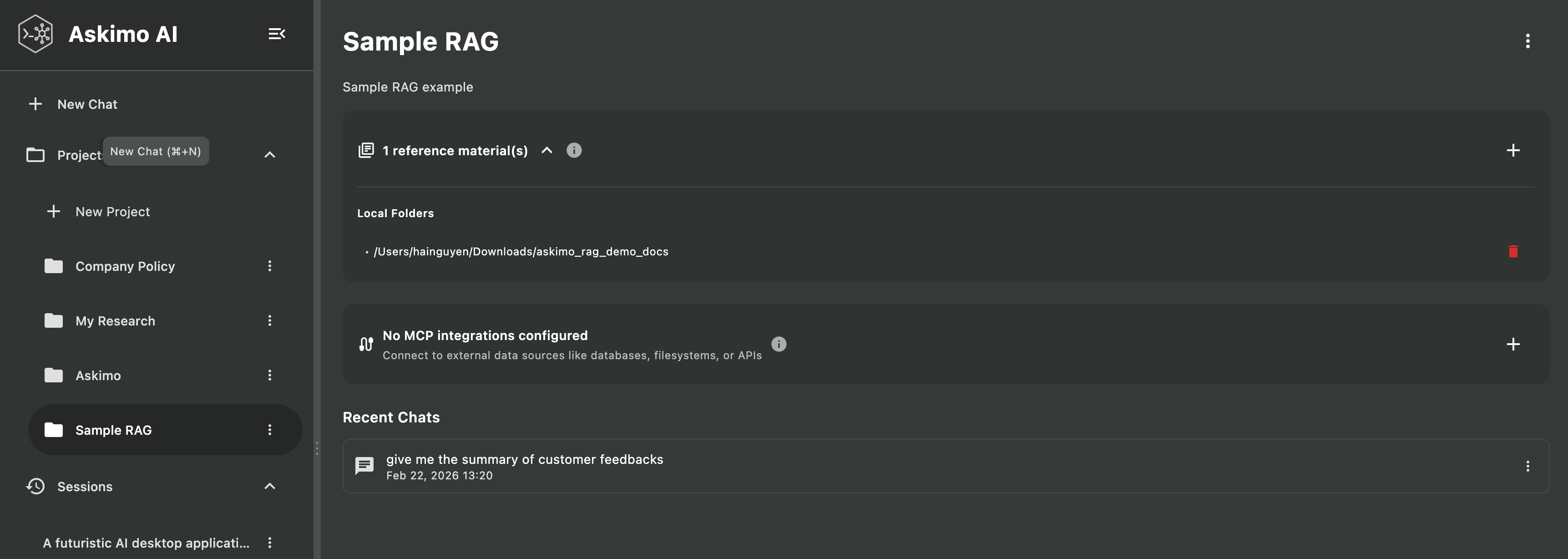
Organize your documents into separate projects:
- Work Documents: Business reports, meeting notes, client files
- Personal Research: Hobbies, interests, learning materials
- Academic Work: Study materials, research papers, thesis notes
- Creative Projects: Writing, art notes, brainstorming docs
Each project has its own isolated index, so queries only search relevant documents.
Automatic Updates
Askimo automatically detects file changes:
- File Modified: Re-indexes just that file
- File Added: Adds to index
- File Deleted: Removes from index
No manual intervention needed for day-to-day edits.
Custom Embedding Models
For advanced users who want to experiment:
# Pull a specialized embedding modelollama pull mxbai-embed-large
# In Askimo Settings → Providers → Ollama# Change embedding model to: mxbai-embed-large
Technical deep-dive: Learn about embedding models, vector search, and indexing architecture in our comprehensive RAG documentation.
Performance Tips
Choose the Right Model for Your Computer
| Your Computer’s Memory | Recommended Model | Best For |
|---|---|---|
| 4-8 GB | phi3 | Quick questions, simple documents |
| 8-16 GB | llama3 | General use, research, writing |
| 16+ GB | mistral | Complex analysis, long documents |
| 32+ GB | deepseek-coder | Large document collections |
Ask Specific Questions
Instead of asking broad questions, be specific:
-
❌ “Tell me about this project”
-
✅ “What are the key findings in the climate research papers?”
-
❌ “Summarize everything”
-
✅ “What methodology was used in the 2023 study?”
RAG vs. Traditional Document Search
| Feature | File Explorer Search | PDF Reader Search | Askimo RAG with Ollama |
|---|---|---|---|
| Keyword Search | ✅ Basic | ✅ Fast | ✅ Instant across all files |
| Semantic Search | ❌ No | ❌ No | ✅ Understands meaning |
| Natural Language | ❌ No | ❌ No | ✅ Ask questions in plain English |
| Cross-Document | ❌ One at a time | ❌ One at a time | ✅ Searches all documents |
| Context Understanding | ❌ No | ❌ No | ✅ Understands relationships |
| Answer Generation | ❌ No | ❌ No | ✅ Explains and summarizes |
| Privacy | ✅ Local | ✅ Local | ✅ Fully local |
Example:
Traditional search: You search for “methodology” and get a list of files containing that word.
Askimo RAG: You ask “What research methodology was used?” and get: “The study used a mixed-methods approach combining quantitative surveys (300 participants) with qualitative interviews (30 experts), as described in your methodology.pdf file.”
Privacy & Security
Everything Stays Local
- Indexing: Happens on your machine using Lucene
- Embeddings: Generated locally by Ollama
- Chat: Ollama models run on your hardware
- Storage: Index files stay in
~/.askimo/
No External Dependencies
Once you’ve pulled Ollama models:
- Works completely offline
- No API calls to external services
- No data leaves your machine
Project Isolation
Each project has its own isolated index:
- Projects can’t access each other’s data
- Deleting a project removes its index
- No cross-project data leakage
Troubleshooting
”AI doesn’t seem to know my documents”
Possible causes:
- Project not indexed yet: Check the project view for indexing status
- Files not supported: Make sure you’re using supported file types (PDF, DOCX, TXT, etc.)
- Files too large: Files over 5 MB are skipped
Solution:
- Wait for indexing to complete (check the status indicator)
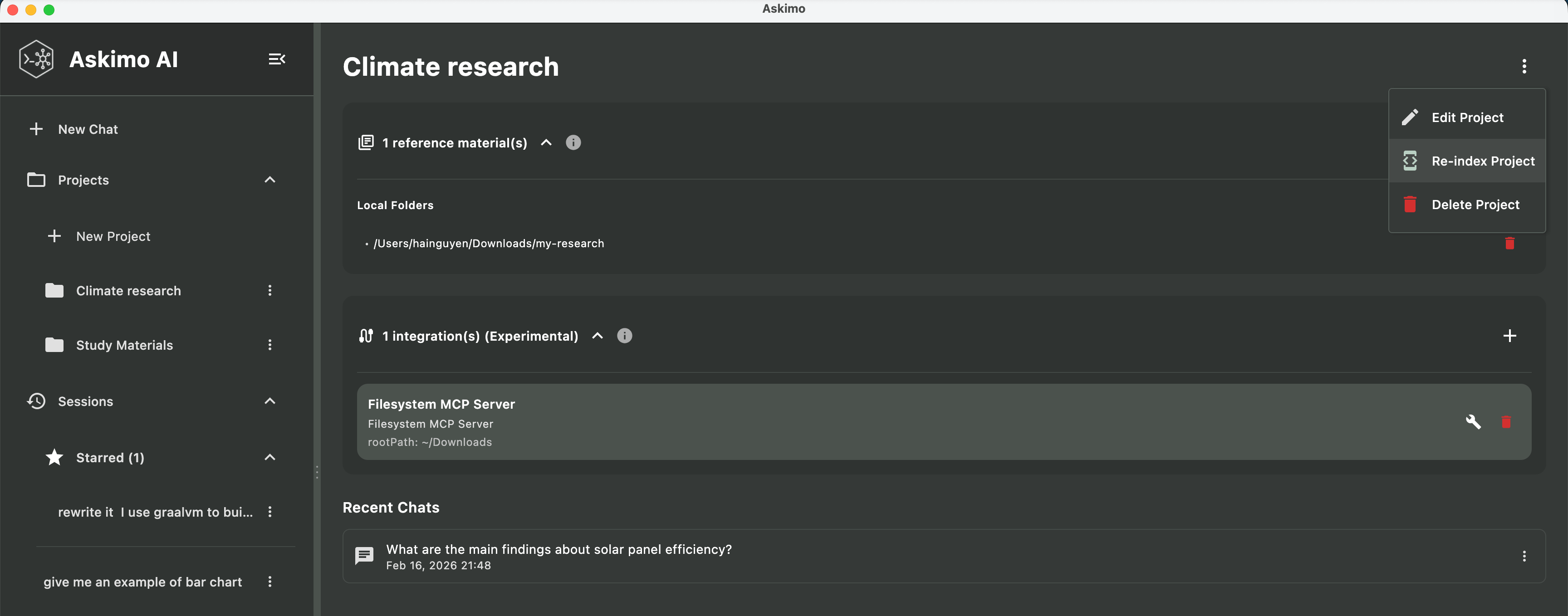
- Try re-indexing: Project settings → “Re-index Project”
- Make sure RAG is enabled for your chat (it should be automatic in project chats)
Slow Indexing
Possible causes:
- Very large document collections (1,000+ files)
- Slow hard drive
- Many large PDF files
Solution:
- Be patient—initial indexing takes time but only happens once
- Future updates are much faster (only changed files are re-indexed)
- Consider organizing into smaller projects if you have 10,000+ files
Running Out of Memory
Possible causes:
- Model is too large for your computer
- Too many applications running
Solution:
- Use a smaller model (
phi3instead ofmistral) - Close other memory-intensive applications
- Restart your computer to free up memory
More help needed? ask in our GitHub discussions.
What You Can Do With RAG
RAG with Ollama in Askimo opens new possibilities:
- Research: Quickly find information across dozens of papers and articles
- Writing: Keep track of characters, plot points, and research for your books
- Learning: Study more effectively by asking questions about your notes and materials
- Work: Find information in reports, meeting notes, and project documentation
- Personal: Organize recipes, travel research, hobby notes, and more
All while keeping your documents private and local—nothing leaves your computer.
Learn More About Askimo & Ollama
Ready to explore more features?
- Askimo with Ollama: The Best Desktop for Local AI - Complete guide to using Askimo as your Ollama GUI with features like chat search, exports, and custom directives
- Best Ollama Clients in 2026 - Compare top Ollama desktop clients and see why Askimo’s RAG capabilities stand out
- Ollama Provider Setup - Detailed configuration guide for Ollama in Askimo
- RAG Technical Documentation - Deep dive into how RAG indexing and retrieval works
Try Askimo today: 👉 https://askimo.chat
Star the project: 👉 https://github.com/haiphucnguyen/askimo
Questions or feedback? Open an issue on GitHub or join our community discussions. We’d love to hear how you’re using RAG with your documents!